The Only File Converter
Your Mac Needs.
The all-in-one file converter for macOS. Drop images, videos, audio, or documents into Jollycat and it handles the rest. 80+ formats, 1,650+ conversion paths, all running locally on your Mac.

Drop files here
or click to browse

What would you like to do?
 Compress
 Transcribe
Done!
photo.png
photo.png
Right at Home in Your Dock
No browser uploads required, no CLI tools, no headaches. Ready for you from your Dock.


How Jollycat Works
Every feature is designed to be fast and frictionless. Drop a file, pick your output, and Jollycat handles the rest.
One Drop. Any Format.
Drag any file onto Jollycat in your menu bar. It instantly detects the format and shows you every possible conversion. Pick one and it processes in the background.
- Automatic file type detection
- Smart format suggestions
- Background processing with progress
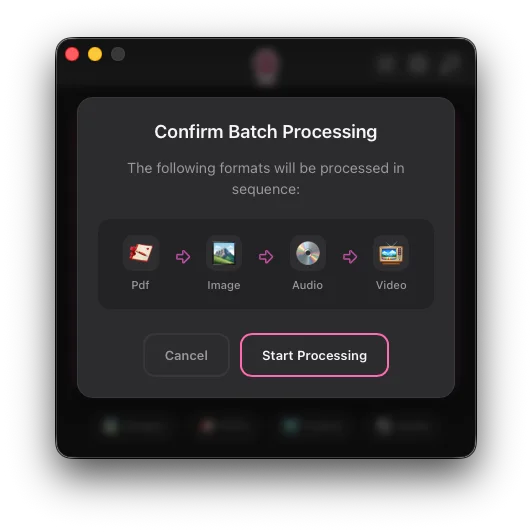
- Batch support for multiple files
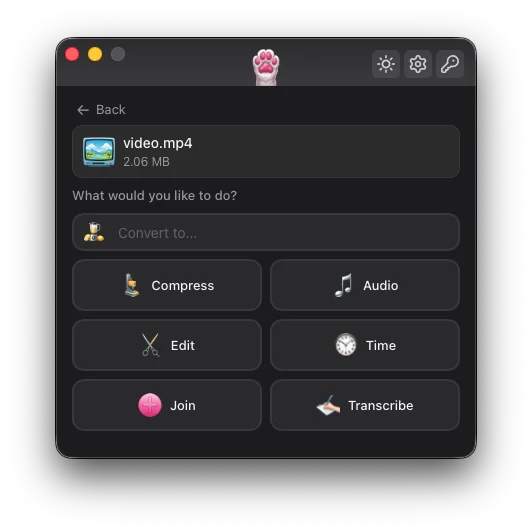
Trim, Crop, and Convert
Without the Complexity
No timeline editors. No rendering queues. Just fast, straightforward video manipulation with native performance.
- Precise trim with frame accuracy
- Crop, rotate, and flip
- Speed control and reverse
- Audio extraction and volume adjustment
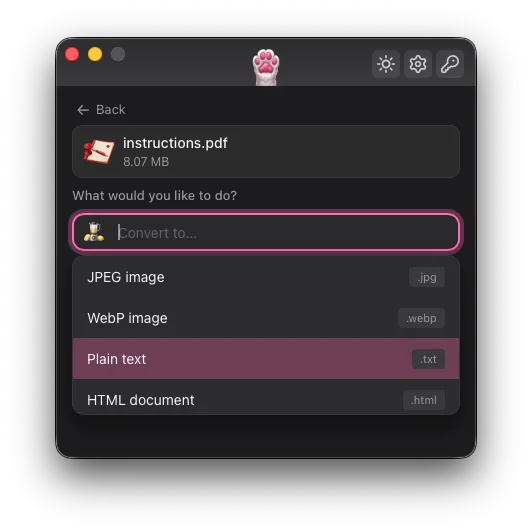
Your PDF Swiss Army Knife
Compress bloated PDFs, split them by page range, merge multiple files, or extract text with OCR. Plus convert between 30+ document formats.
- PDF compression, split, and merge
- OCR for scanned documents
- 30+ markup and document formats
- Office to PDF/HTML conversion
Let Your AI Convert Files For You
Jollycat ships with a built-in MCP server. Connect it to Claude Code, Cursor, or any MCP-compatible agent and let AI convert files on your behalf.
- Works with Claude Code, Cursor, Windsurf
- 5 tools: convert, formats, explain, info, doctor
- One JSON snippet to configure
- Same offline engine — no cloud uploads
{
  "mcpServers": {
    "jollycat": {
      "command": "/Applications/Jollycat.app/Contents/MacOS/jollycat-cli",
      "args": ["mcp-serve"]
    }
  }
}All Your File Conversion Needs.
In One Mac App.
One app replaces your image compressor, video converter, audio editor, PDF toolkit, and document converter. Drop a file, pick a format, done.
Image Converter & Compressor
Convert and compress across 15+ image formats. JPEG, PNG, WebP, HEIC, AVIF, TIFF, RAW photos, PSD, SVG, and more.
Video Converter & Editor
Trim, crop, rotate, adjust speed, reverse, and convert. 15+ video formats with intelligent presets.
Audio Converter & Transcription
12+ audio formats with trim, speed control, transcription, and volume adjustment.
Document & PDF Toolkit
30+ document formats. Compress, split, merge PDFs. Extract text with OCR. Markdown, DOCX, HTML, LaTeX, and beyond.
AI Image Upscaling
Upscale images 2x or 4x with AI super resolution. Enhance photos and artwork on-device with state-of-the-art neural networks.
Text-to-Speech
Convert text to natural-sounding speech with AI voices or macOS native voices. Multi-language support.
Email Conversion
Convert Outlook .msg and .eml email files to PDF, HTML, or plain text. Preserve formatting and attachments.
The Conversion Graph
Every format is a node. Every arrow is a supported conversion. Jollycat automatically finds the shortest path between any two formats.
Offline Processing. Optional Sharing. Complete Privacy.
Every conversion runs locally on your Mac. No cloud processing, no tracking, no telemetry. Network requests only happen for license activation/validation, optional file sharing, and update checks (if enabled).
Nothing Leaves Your Mac
Drop a file in, get a file out. No cloud processing or temporary server storage. Everything runs right here, on your device.
We Know Nothing
No analytics, no telemetry, no usage tracking. We have no idea what files you convert, how often, or when. And we prefer it that way.
Open Source Under the Hood
Every processing engine is open-source and publicly auditable. No proprietary black boxes, no hidden code touching your files.
One-Time Purchase. No Subscriptions.
Buy once, use forever. No monthly fees, no usage limits, no artificial restrictions.
- 80+ formats & 1,650+ conversions
- Video editing, PDF toolkit & OCR
- AI upscaling & text-to-speech
- MCP server for AI agents
- Lifetime updates, no extra cost
- 100% local & private — no telemetry
Lifetime access. One payment. No catch.
What's Coming Next
Jollycat is just getting started. Here's a glimpse at what's on the roadmap.
Core Conversions
80+ formats, video editing, PDF toolkit, OCR, and document conversion. The foundation.
Windows, AI & Creator Tools
Windows support. AI background removal for images. Social media presets. Watermark support. Burned-in subtitles. PNG to SVG conversion.
Frequently Asked Questions
What file formats does Jollycat support?
Jollycat supports 80+ formats across 5 categories: images (JPEG, PNG, WebP, HEIC, AVIF, RAW, PSD, SVG, and more), video (MP4, MOV, MKV, AVI, WebM, and more), audio (MP3, AAC, FLAC, WAV, Opus, and more), documents (Markdown, DOCX, HTML, LaTeX, EPUB, and 30+ more), and PDF operations (compress, split, merge, OCR, extract text).
Does it work on Intel Macs?
Jollycat v1.0 is optimized for Apple Silicon. Intel Mac support may be added in a future update, but it's not currently supported.
Is it really 100% offline?
All file processing happens entirely on your Mac. The app may use the network for license activation/validation, optional file sharing, and update checks if enabled. Processing itself works offline.
How many devices can I use it on?
Jollycat includes 5 device licenses for $9.99. You can deactivate a device at any time to free up an activation slot.
What happens to my files during processing?
Your original files are never modified. Jollycat creates new output files in the location you specify. All processing uses temporary files on your local disk that are cleaned up after completion.
Do I get free updates?
Yes. Your license includes all future updates at no extra cost.
Ready to Master Your Media?
80+ formats. 1,650+ conversions. Offline-first. One app.
Get Jollycat for Mac